Introduction
The Distributed Timetable Assistant (DiTA) is a decentralized platform designed to revolutionize educational scheduling. By moving away from traditional, centralized algorithms, DiTA empowers institutions, instructors, and learners to collaboratively build optimized timetables.
Instead of a single bottleneck, DiTA uses a network of independent Solver Services that compete to solve scheduling problems defined by Institution Packets. This approach ensures scalability, fairness, and the ability to handle complex, real-world constraints that centralized systems often miss.
For a deeper dive into how DiTA works, see the Overview.
Overview
The Challenge
Educational scheduling is inherently complex. It involves balancing the needs of multiple stakeholders—institutions, instructors, supervisors, and learners—against limited resources like classrooms and labs. Traditional centralized systems often struggle with this complexity, leading to rigid schedules that fail to accommodate individual preferences or adapt to changes.
The DiTA Solution
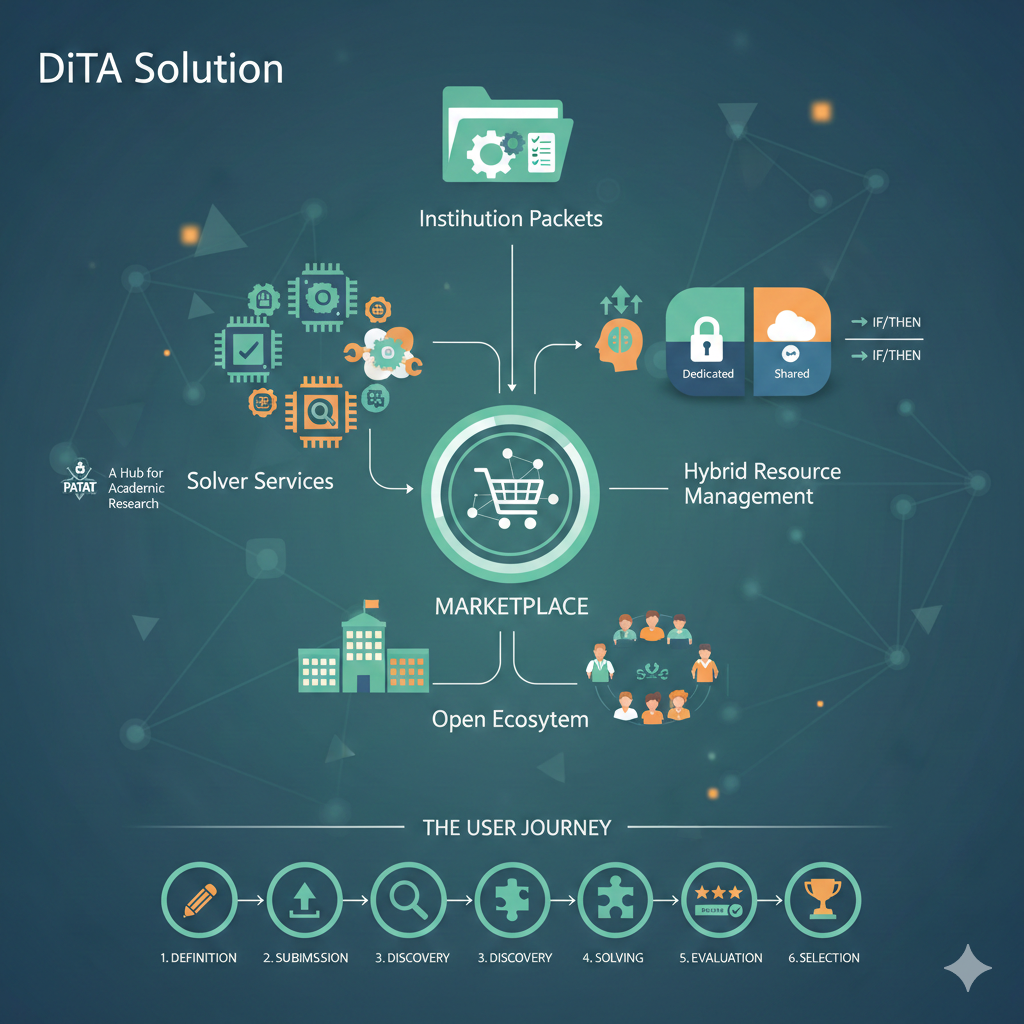
The Distributed Timetable Assistant (DiTA) addresses these challenges through decentralization. It creates a marketplace where scheduling problems are matched with independent solvers.
Key Concepts
- Institution Packets: Structured data units where organizations define their participants, courses, constraints, and resources.
- Solver Services: Independent microservices (human or automated) that propose timetable solutions.
- Marketplace: The ecosystem where packets are published and solutions are traded.
Unique Features
1. Open Ecosystem
DiTA is not just for schools. It is a platform where anyone can register and manage resources.
- Participants: Teachers, students, supervisors.
- Facilities: Schools, universities, gyms, laboratories, and more.
- Sharing: Users can share their availability or resources (e.g., a lab renting out empty slots) with the entire network.
2. Hybrid Resource Management
Institutions can define resources in a flexible, hybrid manner:
- Dedicated: Use your own private list of teachers and rooms.
- Shared: Request resources from the public pool.
- Conditional: Define rules like "If our internal math teachers are fully booked, request a certified math teacher from the platform." This applies to all resource types—instructors, classrooms, or even specific equipment.
3. A Hub for Academic Research
Educational timetabling is a vibrant field of research, with dedicated conferences like PATAT (Practice and Theory of Automated Timetabling) and international competitions (ITC). DiTA provides a perfect real-world testbed for researchers:
- Real Data: Researchers can test their algorithms on real-world constraints and data (anonymized if needed).
- Benchmarking: The marketplace acts as a live benchmark where new algorithms can compete against existing ones.
- Implementation: Students and academics can publish their solvers as microservices, moving their work from theoretical papers to practical application.
How It Works (The User Journey)
- Definition: An institution defines its requirements (courses, teachers, rooms) and bundles them into an Institution Packet.
- Submission: The packet is submitted to the DiTA network.
- Discovery: Independent Solver Services discover the packet and analyze its complexity.
- Solving: Solvers generate proposed timetables, optimizing for constraints and preferences.
- Evaluation: The system scores proposals based on quality, fairness, and rule satisfaction.
- Selection: The institution selects the best solution, and the winning solver is rewarded.
This process allows for iterative improvement, where schedules can be refined over time to achieve the best possible outcome for everyone involved.
Design
The Distributed Timetable Assistant (DiTA) design focuses on extensibility, fairness, and reactive evaluation. It provides the abstract mechanisms that enable the marketplace described in the Overview.

Core Mechanisms
1. The Marketplace
The marketplace is the decoupling layer between Institutions (demand) and Solvers (supply). It ensures that:
- Discovery: Solvers can find problems that match their capabilities.
- Transparency: All transactions and evaluations are verifiable.
- Competition: Multiple solvers can attempt the same problem, driving up solution quality.
2. Reactive Evaluation & Scoring
DiTA employs a reactive scoring model. Solution scores are not static; they adjust based on the changing state of resources.
- Dynamic Scoring: If a resource (e.g., a specific lab) becomes overbooked globally, solutions relying on it may see their scores drop in real-time.
- Fairness: The system penalizes conflicts and rewards efficient resource usage proportionally.
3. Extensibility
The platform is designed to evolve without breaking existing contracts:
- Reward Models: New ways to incentivize solvers (e.g., tokens, reputation) can be plugged in.
- Gamification: Leaderboards and challenges can be added to the solver layer.
- Pluggable Validators: Institutions can add custom validation logic for their specific constraints.
4. Flexible Processing & Privacy
The system supports various processing models to suit different privacy and security needs:
- Self-Hosted Processing: Institutions can run their own solver services to keep data entirely within their infrastructure.
- Conditional Processing: Requests can be routed to specific solvers that meet certain criteria (e.g., "only trusted partners").
- Anonymized Processing: Data can be passed through an anonymization layer before reaching public solvers. The results are transparently de-anonymized upon return, allowing the community to solve the problem without seeing sensitive identity data.
Design Principles
| Principle | Description |
|---|---|
| Decentralization | Logic is distributed; no single central scheduler controls the outcome. |
| Transparency | Evaluation rules and rewards are clear to all participants. |
| Reactivity | The system adapts to state changes in real-time. |
| Scalability | Adding more solvers linearly increases the system's problem-solving capacity. |
Institution Packet
The Institution Packet defines the complete structure and data for an institution within the DITA system. It serves as the root configuration for an institution's scheduling and resource management, including its calendar, facilities, learners, instructors, supervisors, resources, subjects, courses, and organizational units.
Components
The Institution Packet is composed of several aggregates, each responsible for a specific domain of the institution's data:
- Calendar: Defines the institution's scheduling calendar, including recurring time periods, availability statuses, holidays, and scheduling capacity divisions.
- Facilities: Physical spaces such as classrooms, labs, and conference halls.
- Learners: Individuals enrolled in courses.
- Instructors: Individuals responsible for teaching courses.
- Supervisors: Individuals who manage facilities or other resources.
- Resources: Educational materials such as books and equipment.
- Subjects: Standard educational topics such as "Physics 101".
- Courses: Scheduled offerings of subjects.
- Units: Organizational units such as departments or schools.
Example
Below is an example of an Institution Packet configuration in YAML format.
apiVersion: apps/v1
kind: InstitutionPacket

name: Brisbane Central Primary School

address:

cal:
  avails:
    - type: Weekly
      start: 2026-01-28T00:00:00+10:00
      end: 2026-12-12T23:59:59+10:00
      time_cells:
        - type: Daily
          start:
            day: Mon
            time: 00:00:00
          end:
            day: Fri
            time: 23:59:59
          time_cells:
            # Period 1: 08:30 - 09:20
            - type: Basic
              start: 08:30:00
              end: 09:20:00
              rules: []
              status: Available
              div_cap: 1

            # Period 2: 09:20 - 10:10
            - type: Basic
              start: 09:20:00
              end: 10:10:00
              rules: []
              status: Available
              div_cap: 1

            # Break 1 (Morning Tea): 10:10 - 10:40 (Excluded)

            # Period 3: 10:40 - 11:30
            - type: Basic
              start: 10:40:00
              end: 11:30:00
              rules: []
              status: Available
              div_cap: 1

            # Consolidation: 12:20 - 13:00
            - type: Basic
              start: 12:20:00
              end: 13:00:00
              rules: []
              status: Available
              div_cap: 1

            # Break 2 (Lunch): 13:00 - 13:30 (Excluded)

            # Period 5: 13:30 - 14:20
            - type: Basic
              start: 13:30:00
              end: 14:20:00
              rules: []
              status: Available
              div_cap: 1

            # Period 6: 14:20 - 15:10
            - type: Basic
              start: 14:20:00
              end: 15:10:00
              rules: []
              status: Available
              div_cap: 1

        - type: Basic
          start:
            day: Fri
            time: 09:20:00
          end:
            day: Fri
            time: 10:10:00
          rules: []
          status: Undesired
          div_cap: 1

    - type: Holiday
      start: 2026-01-28T00:00:00+10:00
      end: 2026-12-12T23:59:59+10:00
      country: "au-qld"
      status: Unavailable

facilities:
learners:
instructors:
supervisors:
resources:
subjects:
courses:

units:
  - name: Primary Years
    address:
    cal:
      avails:
    facilities:
    learners:
    instructors:
    supervisors:
    resources:
    subjects:
    courses:
The calendar field contains the institution's calendar. The calendar contains an avails collection whose entries define the institution's available and unavailable periods, scheduling preferences, holidays, and capacity divisions. The structure and semantics of the calendar are defined separately in the Calendar documentation.
A Basic time cell can use div_cap to define how its time range can be allocated for scheduling. A value of 1 represents a single scheduling capacity for the entire interval, while values greater than 1 allow the interval to provide multiple capacity divisions. A value of 0 makes the interval flexible, allowing a scheduled activity to use any portion of the defined time range.
Units can also define their own calendar when scheduling information needs to be specified at the unit level.
Calendar
A calendar defines the time availability of an institution or other scheduling entity. It contains a collection of availability entries that describe when a period is active, unavailable, preferred, or undesired.
Structure
A calendar contains an avails collection.
Calendar
| Field | Description |
|---|---|
avails | A list of availability entries. Each entry describes a time range and its scheduling behavior. |
Example:
avails:
  - type: Weekly
    start: 2026-01-28T00:00:00+10:00
    end: 2026-12-12T23:59:59+10:00
    ...
Availability Types
Each availability entry has a type that determines how its time definition is interpreted.
The following types are supported:
| Type | Description |
|---|---|
Yearly | Defines a recurring time pattern based on a month and day of the year. |
Monthly | Defines a recurring time pattern based on a day of the month. |
Weekly | Defines a recurring time pattern based on days of the week. |
Daily | Defines a recurring time pattern based on a time of day. |
Basic | Defines a direct time range without a recurring calendar pattern. |
Holiday | Defines a period associated with public holidays for a specific country or region. |
The Yearly, Monthly, Weekly, and Daily types can contain nested time cells, allowing a calendar definition to progressively narrow a time range.
Common Time Range
Recurring availability types contain a start and end that define the overall period during which the availability applies.
For example:
- type: Weekly
  start: 2026-01-28T00:00:00+10:00
  end: 2026-12-12T23:59:59+10:00
The start and end values use ISO 8601 date-time notation.
Within this range, nested time cells define the recurring portions of the schedule.
Time Cells
Time cells are nested elements used to progressively describe a recurring schedule.
A time cell has a type and may contain:
startendtime_cells
The available nested types depend on the parent time scope.
Weekly
A Weekly availability describes a recurring schedule within a date-time range.
Its nested time cells can be:
DailyBasic
Example:
- type: Weekly
  start: 2026-01-28T00:00:00+10:00
  end: 2026-12-12T23:59:59+10:00
  time_cells:
    - type: Daily
      ...
    - type: Basic
      ...
Daily
A Daily time cell describes a range of days and contains time-based entries.
Its start and end identify the boundaries of the day range. Each boundary contains:
day: The day of the week.time: The time within that day.
For example:
- type: Daily
  start:
    day: Mon
    time: 00:00:00
  end:
    day: Fri
    time: 23:59:59
  time_cells:
    ...
The supported day values are:
| Value | Day |
|---|---|
Mon | Monday |
Tue | Tuesday |
Wed | Wednesday |
Thu | Thursday |
Fri | Friday |
Sat | Saturday |
Sun | Sunday |
A Daily time cell can contain Basic time cells.
Basic
A Basic time cell represents a concrete time interval.
It contains:
| Field | Description |
|---|---|
start | Start of the time interval. |
end | End of the time interval. |
rules | A list of rules associated with the time interval. |
status | The availability status of the time interval. |
div_cap | Defines how the time interval can be divided for scheduling. 0 means the interval is flexible and a scheduled activity may occupy any portion of the interval. 1 means the entire interval can accommodate only one activity. Values greater than 1 allow the interval to be divided for multiple scheduling allocations. |
The div_cap field controls the capacity division of the time interval. It does not determine the duration of the individual scheduled activities.
For example, a flexible interval can be defined as:
- type: Basic
  start: 07:30:00
  end: 13:00:00
  rules: []
  status: Available
  div_cap: 0
With div_cap: 0, an activity can be scheduled at any time within the 07:30–13:00 interval, subject to the other scheduling constraints. The interval is not required to be treated as a single fixed scheduling slot.
A fixed single-capacity interval can be defined as:
- type: Basic
  start: 08:30:00
  end: 09:20:00
  rules: []
  status: Available
  div_cap: 1
With div_cap: 1, the entire interval represents one scheduling capacity and cannot be used for multiple simultaneous activities.
A divisible interval can be defined with a value greater than 1:
- type: Basic
  start: 08:30:00
  end: 10:10:00
  rules: []
  status: Available
  div_cap: 2
With div_cap: 2, the interval provides two units of scheduling capacity. Depending on the scheduling requirements, these capacities can be used to accommodate multiple activities within the interval, such as dividing the interval into separate portions or using it for activities that occur on alternating weeks.
A Basic time cell does not contain further nested time cells.
Availability Status
A basic time cell has a status describing how the time should be treated by the scheduler.
| Status | Description |
|---|---|
Available | The time can be used for scheduling. |
Unavailable | The time cannot be used for scheduling. |
Preferred | The time is preferred for scheduling. |
Undesired | The time should generally be avoided but may be used when necessary. |
For example:
- type: Basic
  start: 09:20:00
  end: 10:10:00
  rules: []
  status: Available
  div_cap: 1
A different status can be used to express a preference or restriction without removing the time range from the calendar:
- type: Basic
  start:
    day: Fri
    time: 09:20:00
  end:
    day: Fri
    time: 10:10:00
  rules: []
  status: Undesired
  div_cap: 1
Holidays
A Holiday availability represents a holiday-related period.
Unlike the recurring time-cell types, a holiday entry directly defines a date-time range and identifies the country or region whose holiday calendar it represents.
It contains:
| Field | Description |
|---|---|
start | Start of the holiday-related period. |
end | End of the holiday-related period. |
country | Country or regional identifier used for the holiday definition. |
status | Availability status applied to the holiday period. |
Example:
- type: Holiday
  start: 2026-01-28T00:00:00+10:00
  end: 2026-12-12T23:59:59+10:00
  country: "au-qld"
  status: Unavailable
For example, setting the status to Unavailable can prevent scheduling during the public holidays represented by the specified region.
Nesting Rules
The hierarchy of time definitions allows a broad period to be progressively refined.
A typical structure is:
Calendar
└── Availability
    └── Weekly
        ├── Daily
        │   └── Basic
        └── Basic
For example, the following structure:
- type: Weekly
  start: 2026-01-28T00:00:00+10:00
  end: 2026-12-12T23:59:59+10:00
  time_cells:
    - type: Daily
      start:
        day: Mon
        time: 00:00:00
      end:
        day: Fri
        time: 23:59:59
      time_cells:
        - type: Basic
          start: 08:30:00
          end: 09:20:00
          rules: []
          status: Available
          div_cap: 1
can be understood as:
- The availability applies during the specified date-time range.
- Within that range, it applies from Monday through Friday.
- Within those days, the specific time interval from
08:30to09:20is available. - The interval provides one scheduling capacity because
div_capis1.
This hierarchical structure allows calendars to represent both broad recurring periods and specific scheduling intervals.
Complete Example
The following example defines a school calendar for 2026. It contains a weekly schedule for Monday through Friday, individual class periods, excluded breaks, a separate undesired period, and a holiday period for Queensland.
avails:
  - type: Weekly
    start: 2026-01-28T00:00:00+10:00
    end: 2026-12-12T23:59:59+10:00
    time_cells:
      - type: Daily
        start:
          day: Mon
          time: 00:00:00
        end:
          day: Fri
          time: 23:59:59
        time_cells:
          # Period 1: 08:30 - 09:20
          - type: Basic
            start: 08:30:00
            end: 09:20:00
            rules: []
            status: Available
            div_cap: 1

          # Period 2: 09:20 - 10:10
          - type: Basic
            start: 09:20:00
            end: 10:10:00
            rules: []
            status: Available
            div_cap: 1

          # Break 1 (Morning Tea): 10:10 - 10:40 (Excluded)

          # Period 3: 10:40 - 11:30
          - type: Basic
            start: 10:40:00
            end: 11:30:00
            rules: []
            status: Available
            div_cap: 1

          # Consolidation: 12:20 - 13:00
          - type: Basic
            start: 12:20:00
            end: 13:00:00
            rules: []
            status: Available
            div_cap: 1

          # Break 2 (Lunch): 13:00 - 13:30 (Excluded)

          # Period 5: 13:30 - 14:20
          - type: Basic
            start: 13:30:00
            end: 14:20:00
            rules: []
            status: Available
            div_cap: 1

          # Period 6: 14:20 - 15:10
          - type: Basic
            start: 14:20:00
            end: 15:10:00
            rules: []
            status: Available
            div_cap: 1

      - type: Basic
        start:
          day: Fri
          time: 09:20:00
        end:
          day: Fri
          time: 10:10:00
        rules: []
        status: Undesired
        div_cap: 1

  - type: Holiday
    start: 2026-01-28T00:00:00+10:00
    end: 2026-12-12T23:59:59+10:00
    country: "au-qld"
    status: Unavailable
Facilities
Facilities represent physical spaces such as classrooms, labs, gyms, or conference halls that can be scheduled for use.
Learners
Learners are individuals who enroll in courses to receive training or education.
Instructors
Instructors are individuals responsible for teaching and guiding learners in one or more courses.
Supervisors
Individuals assigned to supervise or manage the facility.
Resources
Resources are educational materials such as books, videos, or documents linked to subjects.
Subjects
Subjects define standard educational topics such as “Physics 2” that can be taught across multiple courses.
Courses
Courses are scheduled offerings of a subject, typically linked to a specific instructor and academy.
Units
Organizational units such as schools, departments, or training centers, each with their own scheduling and resources.
Data Anonymization for Solvers
Status
Proposed
Motivation
Some institutions (e.g. universities, academies) are unwilling or unable to expose real operational data (instructors, learners, facilities, locations, internal constraints) to external solver services.
However, DiTA fundamentally relies on third-party or distributed solvers to process scheduling problems. This creates a direct tension between:
- data privacy and confidentiality, and
- solver effectiveness and correctness.
This feature introduces a Data Anonymization System that enables solver participation without exposing real or sensitive institutional data, while preserving correctness guarantees or explicitly declaring deviations.
Problem Statement
We need a mechanism that:
- prevents solvers from accessing real institutional data,
- allows solvers to operate on anonymized or transformed packets,
- guarantees that the produced solution is either:
- equivalent to the solution generated on real data, or
- explicitly marked as potentially divergent with clear reasons.
This mechanism must be flexible, pluggable, and institution-controlled.
Core Requirements
R1. Packet Transformation
The system MUST be able to:
- modify packet data,
- and, when required, modify the structure of the packet itself, to ensure that real data cannot be inferred or reconstructed.
This includes:
- replacing identifiers,
- abstracting entities,
- removing or generalizing sensitive attributes,
- restructuring references to external resources.
R2. Result Equivalence Guarantee
For any anonymized packet:
- The solution produced by processing anonymized data MUST be:
- equivalent to the solution that would have been produced using real data, or
- accompanied by an explicit declaration of discrepancies and their causes.
The anonymization layer MUST therefore:
- understand the semantic impact of transformations, or
- expose uncertainty clearly and transparently.
R3. Resource Access Interception
The anonymization system MAY alter resource references inside the packet.
Problem Example
A packet may contain a statement such as:
“Use instructors of my university”
If passed directly:
- the solver may request the real university resource,
- leading to leakage of sensitive data.
Required Behavior
The anonymization system MUST handle this by one of the following strategies:
-
Pre-fetch and Embed
- Fetch real data from the institution resource.
- Anonymize it.
- Embed the anonymized dataset directly inside the packet.
-
Proxy Resource Redirection
- Replace the original resource address in the packet.
- Redirect it to an anonymization-compliant worker or proxy.
- This worker:
- fetches real data,
- anonymizes it according to defined rules,
- serves anonymized responses to the solver.
In both cases:
- the solver MUST never access real institutional endpoints directly.
R4. Pluggable Anonymization Systems
DiTA MUST support multiple anonymization systems.
Each anonymization system:
- may define its own rules,
- may implement different transformation strategies,
- may offer different trade-offs between privacy and solver effectiveness.
The choice of anonymization system is the responsibility of the institution (customer), not the platform.
R5. Hard-to-Anonymize Data Handling
Some data types may be:
- extremely difficult to anonymize,
- or fundamentally non-anonymizable without breaking correctness.
A primary example is location data.
Required Capability
The anonymization system MAY provide alternative computational strategies, such as:
- embedding a distance-calculation worker inside the packet,
- exposing derived metrics (e.g. travel time, distance matrix) instead of raw coordinates,
- or introducing innovative abstractions that preserve solver utility.
If no safe strategy exists:
- the anonymization system MUST declare limitations explicitly.
Non-Goals
- This document does NOT define a specific anonymization algorithm.
- This document does NOT mandate cryptographic techniques.
- This document does NOT define implementation details or deployment topology.
These concerns belong to architecture-level decisions (ADR).
Open Questions
- Where should anonymization be applied: pre-packet, gateway-level, or per-resource?
- How should equivalence or divergence be formally defined and verified?
- What guarantees can realistically be enforced across heterogeneous solvers?
- How should anonymization metadata be exposed to solvers, if at all?
Next Steps
- Evaluate architectural approaches for anonymization placement.
- Define trust boundaries between platform, anonymizer, and solver.
- Create ADR(s) to formalize architectural decisions derived from this design.
Architecture
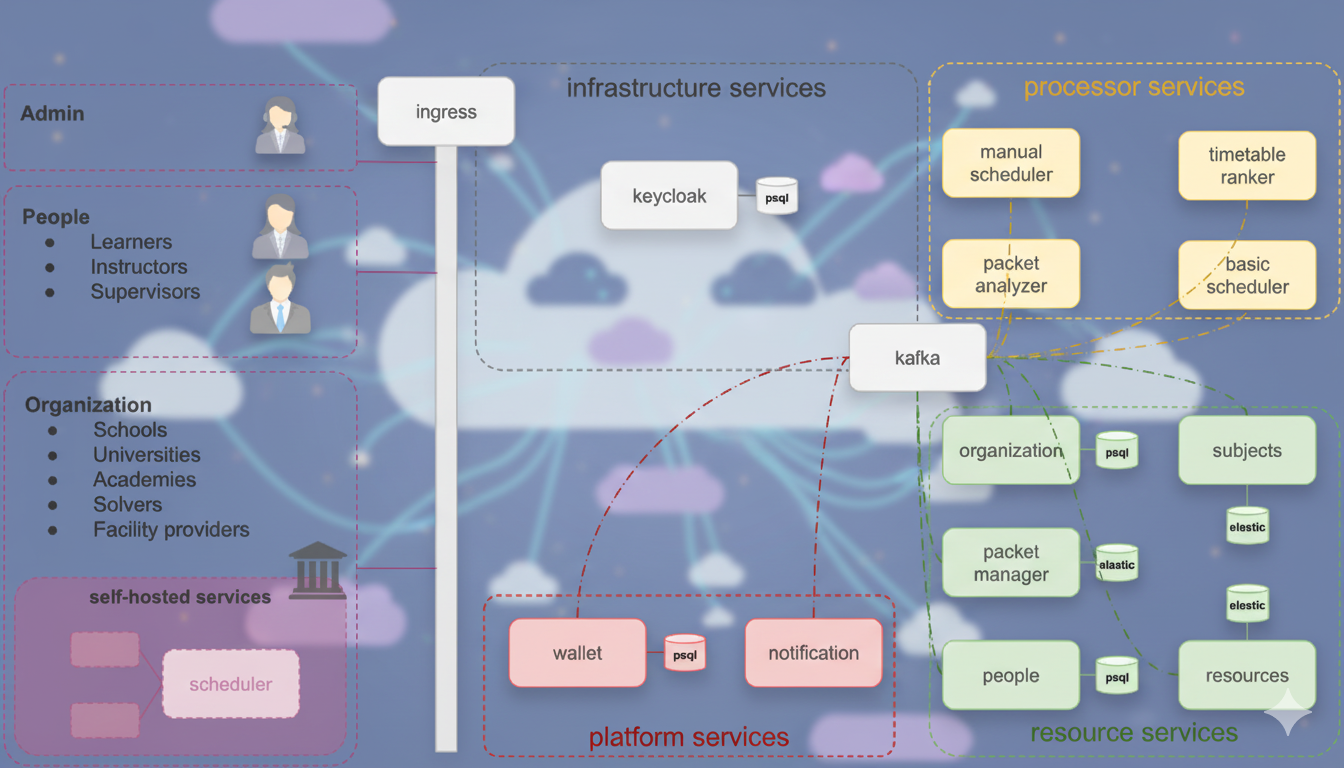
The DiTA platform is built as a set of Kubernetes-native microservices. It enforces a clear separation between data management (Resources), logic (Processors), and platform utilities.
Deployment Flexibility:
- Full Self-Hosting: The entire platform can be deployed on-premise for complete control.
- Hybrid: Use the public cloud for some services (e.g., the marketplace) while keeping sensitive Resource Services self-hosted.
- Service-Level: Individual services can be swapped or hosted independently.
Key Tech Stack:
- Communication: Kafka (Event Bus), gRPC/REST.
- State: PostgreSQL (Relational), Elasticsearch (Search/Index), Redis (Cache/Ephemeral).
- Identity: Keycloak.
Service Groups
1. Resource Services (The "Truth")
These services manage the canonical domain data. They are the source of truth for the system.
packet-manager: Manages submission packets and their lifecycle. Uses Elasticsearch for high-performance search.people: Manages profiles (instructors, students) and availability.organization: Manages school/university metadata.resources: Manages physical assets (rooms, equipment).subjects: Manages curriculum and subject definitions.
2. Processor Services (The "Workers")
These services consume events and perform heavy lifting.
basic-scheduler: The default internal automated solver that generates timetables. Uses Redis for job queues.manual-scheduler: Supports human-in-the-loop editing.packet-analyzer: Extracts features (complexity, constraints) from packets to guide solvers.timetable-ranker: Stream processor that scores incoming solutions.
3. Platform & Infrastructure
wallet: Manages credits and transactions (Cloud-exclusive).notification: Handles alerts and messages.kafka: The central nervous system. All services publish/subscribe to domain events here.ingress: Handles routing and load balancing.
Technical Interaction Flow
The system relies on an Event-Driven Architecture:
- Ingestion: API calls to Resource Services emit events (e.g.,
packet.created) to Kafka. - Processing: Processor Services (like
basic-scheduler) subscribe to these topics. - Result Publication: Processors publish results (e.g.,
candidate.created) back to Kafka. - Aggregation: Analytics services (
timetable-ranker) consume result streams to update scores in real-time.
Architecture Decision Records (ADR)
This section contains documentation regarding significant architectural decisions for the project.
0001. DiTA as a Public Platform
Date: 2025-12-25
Status
Proposed
Context
DiTA addresses complex educational and institutional scheduling problems that cannot be efficiently solved by a single centralized service. The problem space inherently involves:
- heterogeneous institutions with distinct constraints,
- multiple categories of users (institutions, instructors, learners, supervisors),
- third-party computational solvers with diverse optimization strategies,
- optional auxiliary services such as data anonymization, validation, and enrichment.
A product-oriented or monolithic service model would:
- limit extensibility,
- constrain innovation to the core team,
- centralize trust and computational responsibility,
- and reduce scalability across domains and geographies.
To support an open ecosystem of participants, solvers, and services, DiTA must decide whether it operates as:
- a closed scheduling product,
- a managed scheduling service,
- or a public platform with an extensible service and solver ecosystem.
This ADR captures the decision to position DiTA explicitly as a public platform.
Decision
DiTA SHALL be designed, developed, and operated as a public platform, not merely as a scheduling service or product.
The platform characteristics are defined as follows:
- DiTA is a public platform accessible to all users.
- Membership and basic usage of the platform are free of charge.
- Advanced capabilities are provided via paid plans and services.
- Institutions and individuals interact with DiTA as platform participants, not passive consumers.
- Solvers and anonymization systems are first-class platform participants, not internal-only components.
Platform Participants
The platform serves the following participant categories:
- Institutions: schools, universities, academies, laboratories, sports facilities.
- Individuals: students, learners, instructors, teachers, supervisors.
- Service Providers:
- Solver services (internal and external).
- Data anonymization services (internal and external).
- Other future auxiliary services compliant with platform standards.
Revenue Model (Platform-Level)
DiTA revenue is derived from platform participation and service facilitation, including:
- Subscription-based plans for advanced features.
- Dedicated (private) deployments of the full DiTA platform for a single organization.
- Commissions on:
- rewards paid to solvers for packet resolution,
- anonymization services applied to packets,
- any external service executed through the platform.
- Direct revenue from:
- packet resolution performed by DiTA-operated solvers,
- packet anonymization performed by DiTA-operated anonymization services.
- Verification and trust services, including:
- identity verification,
- reputation and tiering systems,
- “verified” (blue-check) status for institutions, individuals, solvers, and external services.
At early stages of the platform lifecycle, DiTA SHALL prioritize adoption and ecosystem growth, and may operate largely free of charge until a sustainable service threshold is reached.
Consequences
Positive Consequences
- Enables a scalable ecosystem of independent solvers and services.
- Decouples core platform evolution from optimization and anonymization innovation.
- Supports diverse institutional privacy, trust, and deployment requirements.
- Creates multiple sustainable revenue streams without locking users into a single service model.
- Positions DiTA as infrastructure rather than a single-purpose application.
Negative Consequences and Risks
- Increased architectural and operational complexity.
- Larger attack surface and stricter security requirements.
- Governance challenges around third-party services and trust boundaries.
- Necessitates formal contracts, APIs, standards, and compliance mechanisms.
- Requires careful balance between openness and platform abuse prevention.
These risks must be mitigated through:
- strong architectural boundaries,
- explicit service contracts,
- clear governance and verification mechanisms,
- and future ADRs defining trust, security, and platform policies.
0002. Select Rust as the Primary Language for Microservices
Date: 2025-12-19
Status
Accepted (with explicit constraints and exit criteria)
Context
DiTA is a distributed, computation-heavy platform whose core value is derived from solver quality, scalability, and cost-efficient execution of scheduling workloads. The system consists of multiple microservices with different characteristics, including:
- CPU-bound solver services with high parallelism
- Coordination- and orchestration-heavy services
- I/O-bound control-plane services
Choosing a primary implementation language is a long-term architectural commitment that directly impacts:
- Infrastructure cost
- Development velocity
- System reliability
- Hiring and onboarding
- Ability to revise architectural decisions over time
This decision must therefore be justified as a cost–benefit trade-off, not as a purely technical or ideological preference.
Decision
Rust is selected as the primary (default) language for DiTA microservices under clearly defined constraints, with explicit recognition of its costs, risks, and limits.
Rust is mandatory for:
- Compute-bound services (e.g. solvers, evaluators, optimizers)
- Latency-sensitive or high-throughput services
- Services where memory safety, determinism, and predictable performance materially affect infrastructure cost or correctness
Rust is not mandatory for:
- Research, experimentation, or rapid prototyping services
- ML-heavy or numerics-heavy components where ecosystem maturity is critical
- Glue or orchestration services where development speed outweighs runtime efficiency
Non-Rust services must be isolated behind well-defined network boundaries (HTTP/gRPC) and treated as replaceable components.
Rationale
Why Rust
Rust provides the following economic and architectural advantages for DiTA’s core workloads:
- Strong memory safety guarantees without garbage collection, reducing production risk in long-running services
- Predictable performance characteristics suitable for CPU-intensive solvers
- Low runtime overhead, enabling higher density per node and lower infrastructure cost
- Explicit ownership and concurrency models that align well with distributed, parallel computation
These benefits directly support DiTA’s long-term goals of scalability, cost efficiency, and correctness in solver execution.
Recognized Costs and Risks
This decision explicitly acknowledges the non-trivial costs of adopting Rust:
- Higher onboarding and learning curve compared to mainstream backend languages
- Slower iteration speed for early-stage product exploration
- Increased risk of early abstraction lock-in due to strong type constraints
- Smaller ecosystem for advanced numerical computing and ML compared to Python/C++
Rust can amplify good design but also harden bad design early. This risk is accepted and mitigated through scope control and architectural discipline rather than ignored.
Alternatives Considered
Go
- Pros: Fast onboarding, strong ecosystem for distributed systems, low operational friction
- Cons: Garbage collection overhead, weaker guarantees for memory and concurrency safety
- Rejected as default due to poorer suitability for compute-heavy solver workloads
Python
- Pros: Excellent ecosystem for ML and optimization, very fast prototyping
- Cons: Poor runtime performance, higher operational cost at scale
- Accepted as a secondary language for research and experimentation only
C++
- Pros: Maximum performance and mature numerical libraries
- Cons: High maintenance cost, memory safety risks, slower team scalability
- Rejected due to long-term reliability and operational risk
Scope Control and Boundaries
To prevent overreach, the following constraints apply:
- Rust adoption starts with solver and performance-critical services only
- Control-plane and orchestration services may use alternative languages if justified
- All inter-service communication must occur via explicit network protocols
- No cross-language in-process coupling is allowed
Exit Criteria and Re-evaluation
This decision is not irreversible.
The choice of Rust will be re-evaluated if one or more of the following occur:
- Development velocity becomes a bottleneck to product–market fit
- Hiring or onboarding costs exceed acceptable thresholds
- A significant portion of services are I/O-bound with no measurable performance benefit from Rust
- Operational complexity outweighs infrastructure savings
A formal review must be conducted before expanding Rust to additional service categories.
Consequences
Positive
- Lower runtime risk and improved reliability for core solver services
- Reduced infrastructure cost for CPU-bound workloads
- Strong alignment between language semantics and parallel computation needs
Negative
- Higher upfront development and onboarding cost
- Increased architectural rigidity if boundaries are poorly designed
- Need for disciplined scope control to avoid premature over-engineering
This ADR represents a constrained, economically motivated decision, not a universal endorsement of Rust.
0003. Selecting Angular for the DiTA Frontend
Date: 2026-06-19
Status
Accepted
Context
DiTA is a web-based, multi-role, enterprise-grade platform consisting of multiple portals and concurrent workflows, including users, institutions, services, administrative dashboards, complex forms, data tables, reports, and visualizations.
In such a product, the challenge is not merely rendering a user interface. The platform must ensure that:
- The project structure remains predictable over time.
- Separation of concerns is enforced at the file and module levels.
- Onboarding new team members does not introduce significant overhead.
- Large-scale UI development does not lead to architectural degradation.
- A mature ecosystem of enterprise-grade libraries is available for tables, forms, charts, validation, and layout management.
- The system maintains acceptable performance across a wide range of hardware, including older laptops and resource-constrained educational environments.
Therefore, the frontend framework must be selected based on long-term maintainability, structural consistency, ecosystem maturity, and predictable performance rather than solely on initial development speed.
Decision
Angular is selected as the primary frontend framework for DiTA.
React, Yew, and Flutter are not selected for the primary frontend implementation of the platform.
Why React Is Not Selected
React follows a less opinionated approach than Angular and delegates many architectural decisions to the development team. While this flexibility can be advantageous in some projects, DiTA benefits from a framework that provides stronger structural conventions and more explicit guidance for long-term development.
For DiTA, we require a framework that:
- Clearly defines modular boundaries.
- Enforces conventions from the beginning.
- Prevents the gradual evolution of the UI into a collection of inconsistent and loosely structured components.
React does not provide this level of opinionation by default. For this project, the risk of architectural drift outweighs the benefits of additional flexibility.
Why Yew Is Not Selected
Yew uses Rust and the html! macro to define views, resulting in a JSX-like development model. While technically interesting, it does not provide the primary advantage sought for DiTA: a mature enterprise-grade UI ecosystem.
DiTA requires mature solutions for:
- Large-scale data grids.
- Charts and dashboards.
- Complex forms.
- Enterprise UI components.
- Calendars and scheduling interfaces.
- Advanced layout and design tooling.
Although Yew offers compelling technical characteristics, it has not yet reached Angular's level of maturity in terms of UI libraries, development experience, talent availability, and enterprise-oriented tooling. As a result, selecting Yew would increase both implementation and maintenance risks.
Additionally, Yew's UI definition model is based on the html! macro and does not provide the traditional separation of templates, styles, and logic available in Angular. This does not align with DiTA's architectural goals for frontend code organization and maintainability.
Why Flutter Is Not Selected
Flutter follows a widget-centric architecture in which the UI is defined as a tree of widgets. This approach is highly effective for cross-platform applications. However, DiTA is fundamentally a web-first product whose requirements revolve around browser-native behavior, DOM integration, web ecosystem compatibility, forms, accessibility, and established enterprise web patterns.
For DiTA, Flutter introduces several trade-offs:
- Reduced alignment with the broader web ecosystem and its mature libraries.
- Additional abstraction layers where precise control over structure, semantics, and integration is required.
- Dependence on the Flutter rendering engine rather than direct interaction with the browser DOM.
- Increased risk of performance issues in chart-heavy, dashboard-oriented, and highly interactive data-driven scenarios.
In Flutter Web, the rendering path typically follows:
Dart
 ↓
Flutter Engine
 ↓
CanvasKit / HTML Renderer
 ↓
Browser
In Angular, rendering is much closer to the browser's native rendering model:
Angular
 ↓
DOM
 ↓
Browser
This architectural difference does not imply that Flutter Web is inherently slow. However, it introduces an additional rendering layer between the application and the browser, which can incur performance overhead in certain scenarios.
During an initial evaluation of a Flutter Web prototype, noticeable UI stalls were observed while interacting with charts and hover-driven visualizations on mid-range and older hardware. Although this observation alone is insufficient for a definitive judgment of Flutter, it indicates a higher performance risk for a platform such as DiTA, which relies heavily on dashboards, charts, and data-intensive interactions.
Furthermore, Flutter's primary advantage lies in unified Mobile, Desktop, and Web development. DiTA is currently a web-first platform whose core requirements are better served by technologies that are deeply integrated with the web ecosystem.
For these reasons, Flutter is not considered the most appropriate primary frontend technology for this project.
Why Angular Is Selected
Angular is a better fit for DiTA because it:
- Is template-first and opinionated, enforcing structure from the outset.
- Provides clearer conventions for long-lived enterprise applications.
- Offers natural separation between templates, styles, and business logic.
- Simplifies code reviews and long-term maintenance in multi-developer teams.
- Has a mature enterprise ecosystem for tables, forms, layouts, charts, and data visualization.
- Works directly with the DOM and standard browser capabilities.
- Delivers more predictable behavior across a wider range of hardware configurations.
- Aligns well with DiTA's requirements for multiple portals, dashboards, and data-driven interfaces.
In summary, Angular reduces architectural disorder, lowers performance risk, and improves the platform's ability to scale and evolve over time.
Consequences
Positive Consequences
- Frontend architecture becomes predictable and enforceable.
- Large-scale UI code remains easier to maintain.
- Onboarding new developers becomes simpler.
- Integration of mature web libraries for charts, tables, and dashboards becomes easier.
Costs and Risks
- Initial boilerplate is greater than in React.
- Angular has a steeper learning curve for developers unfamiliar with the framework.
- Poor team discipline can still lead to complexity and code quality issues.
- Achieving a high-quality architecture requires clear conventions and code review policies.
Risk Mitigation
- Define a clear modular architecture from the beginning.
- Adopt consistent conventions for feature modules, components, services, and models.
- Limit component size and decompose complex UIs into smaller units.
- Establish an internal design system and shared UI layer.
- Enforce code reviews to prevent architectural drift.
- Define performance budgets and continuously monitor them throughout development.
Conclusion
Angular is the preferred frontend framework for DiTA because it simultaneously addresses four critical requirements: structure, maintainability, web ecosystem maturity, and predictable performance.
While React, Yew, and Flutter each offer advantages in specific contexts, their benefits do not outweigh their associated costs and risks for DiTA's current requirements and long-term growth strategy.
Development
This section contains technical decisions and service implementations.
The technical development guide is available at: eg.dita.hasankarimi.ir
State Management
This document defines the principles for implementing Global State in Front-end modules based on Leptos. The goal is to establish a consistent, maintainable, and extensible pattern for storing and sharing state at the application level.
1. Hook File Structure for Each Module
Any module that needs to maintain Global State must create a file in the hooks directory named after the module. The content of this file must follow the pattern below exactly.
1.1. Private Context Struct
- Define a private
structwith theContextsuffix (e.g.,SidenavContext). - This struct holds the required state fields.
- It must derive/implement
Store(usingreactive_stores::Store) so it can be provided as a context in Leptos. - It must implement
SerializeandDeserializeto enable storage in LocalStorage.
1.2. Storage Key
Define a constant for the storage key:
#![allow(unused)]
fn main() {
const LOCALSTORAGE_KEY: &str = "sidenav";
}
1.3. Public Mode Struct
Define a public struct with the Mode suffix that provides the interface for working with the Context to other modules.
Modules and consumers must interact with this state by calling SidenavMode::new():
#![allow(unused)]
fn main() {
let sidenav_ctx = SidenavMode::new();
}
This struct must also implement the StateProvider trait.
1.4. Full Example
#![allow(unused)]
fn main() {
use dita_state::app_state::StateProvider;
use dita_state::persist_state::{init_ctx, use_ctx, provide};

const LOCALSTORAGE_KEY: &str = "sidenav";

#[derive(Debug, Clone, Copy, Default, Store, Serialize, Deserialize, PartialEq)]
struct SidenavContext {
    pub open: bool,
}

#[derive(Clone, Copy)]
pub struct SidenavMode {
    ctx: Store<SidenavContext>,
}

impl SidenavMode {
    pub fn new() -> Self {
        Self {
            ctx: use_ctx()
                .unwrap_or_else(|| {
                    logging::warn!(
                        "Use Context: FAILED. SidenavContext not initialized at root component, build app state with sidenav state"
                    );
                    init_ctx(LOCALSTORAGE_KEY)
                }),
        }
    }

    pub fn toggle(self) {
        self.ctx.open().update(|v| *v = !*v);
    }

    pub fn is_open(&self) -> Signal<bool> {
        self.ctx.open().into()
    }
}

impl StateProvider for SidenavMode {
    fn provide() {
        provide::<SidenavContext>(LOCALSTORAGE_KEY);
    }
}
}
2. Integration with dita-state and AppStateBuilder
Every application that uses the module must register the module's state management struct by passing it to the generic with method of the state builder. This ensures that the corresponding provider is executed when the global state is constructed.
Recommended path: apps/<app-name>/src/state.rs
#![allow(unused)]
fn main() {
use dita_design_system::hooks::sidenav::SidenavMode;
use dita_state::app_state::AppState;

pub fn init() {
    AppState::builder()
        .with::<SidenavMode>()
        .build();
}
}
3. Calling Init in the Root Component
The state::init() method must be called in the application's Root component so that all Global States are provided and become available throughout the component tree:
#![allow(unused)]
fn main() {
// In the Root component
state::init();
}
Workflow Summary
| Step | Location | Action |
|---|---|---|
| 1 | hooks/{module}.rs | Define private *Context, public *Mode, storage key, and implement StateProvider |
| 2 | apps/{app}/src/state.rs | Register the Mode struct using AppState::builder().with::<ModuleMode>() |
| 3 | Root component | Call state::init() |
By following this pattern, Global States are managed in a consistent, extensible way that aligns with the Leptos architecture and the persistence layer of the dita_state library.
License
The Distributed Timetable Assistant (DiTA) project, including its source code, design, documentation, and conceptual framework, is the exclusive intellectual property of its owner.
No part of this project — including but not limited to the ideas, algorithms, architectural design, or implementation details — may be copied, reproduced, modified, distributed, or utilized in any form, whether commercial or non-commercial, without explicit prior written permission from the owner.
Unauthorized use, replication, or distribution of any component of this project constitutes a violation of intellectual property rights and may lead to legal action.
© 2025 DiTA Project. All Rights Reserved.